


Our latest release is here, and it’s all about giving you more power with less effort. Hudu v2.37.0 introduces time-saving keyboard shortcuts, enhanced email record monitoring, deeper visibility into website changes, and smarter Hudini assistance.
Highlights
Keyboard shortcuts
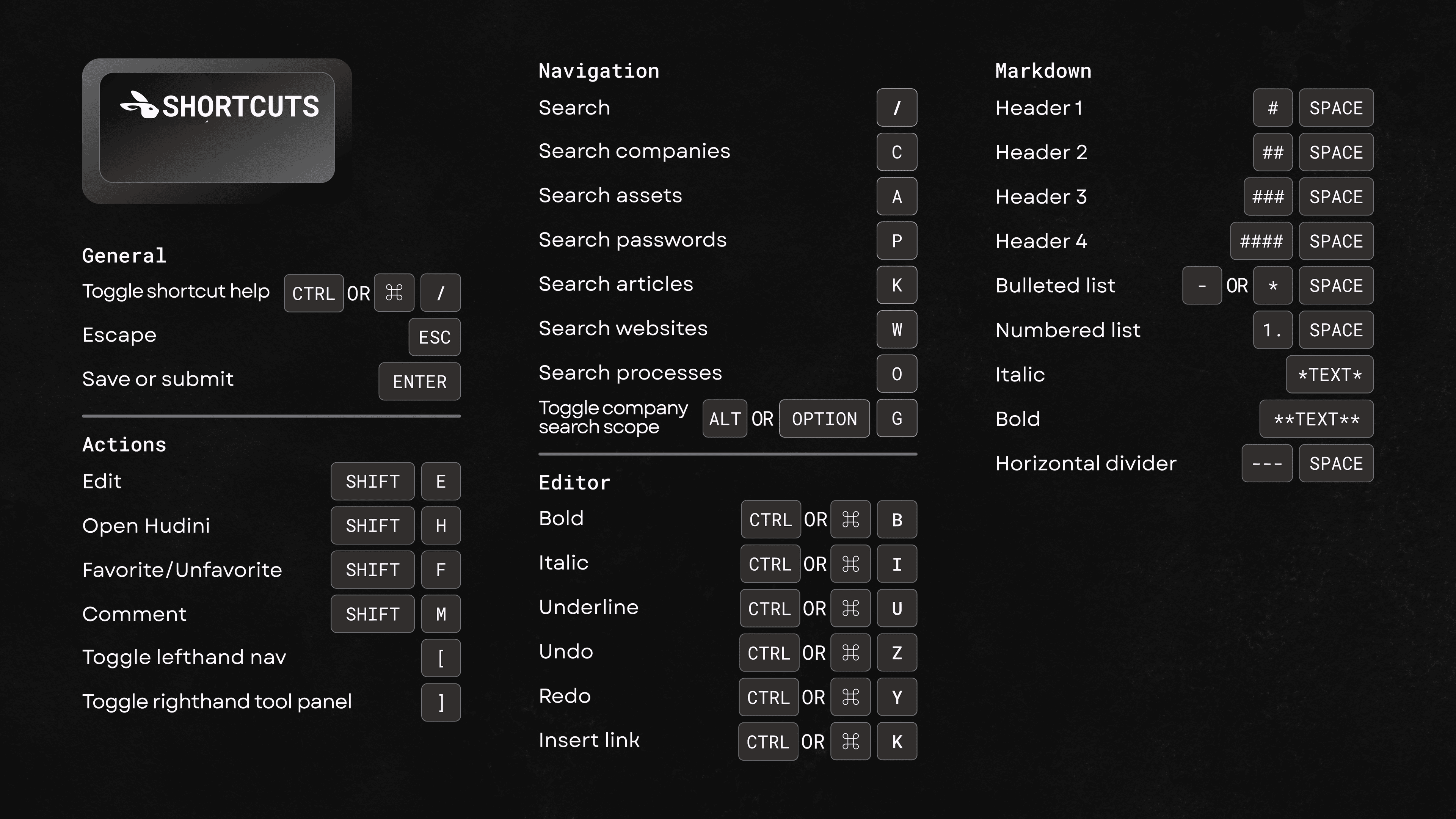
Get where you need to go - faster. Introducing powerful keyboard shortcuts for frequent actions like editing, favoriting, and searching. Hit / to open a general search, or use dedicated shortcuts to jump straight to specific items (like passwords or processes with O). Faster navigation means less clicking, less context switching, and more time solving.
Here is a full list of the current shortcuts, but you can see the list inside of your instance with CTRL or ⌘ + / as well.
Website monitoring
Enable DMARC, DKIM, and SPF monitoring on a per-website basis to automatically pull in DNS records. Quickly verify domain configurations, catch misconfigurations before they impact deliverability, and ensure airtight email security - all from one centralized view.
You can also track and compare website changes over time with a clear version history. Click any update from the righthand activity panel to see exactly what changed. Spot issues faster, verify updates, and maintain a reliable audit trail.
Hudini KB article awareness
Hudini can now understand the KB article you’re viewing, so you can ask questions or get a quick summary without leaving the page. It’s a faster way to get context, clarify details, or pull key info while staying focused on the task at hand.
Export My Vault

Need a backup or want to analyze offline? You can now export My Vault data in CSV format - making it easy to review, migrate, or share credentials securely when needed.
Tool panel updates

You can now share files, photos, and comments directly in the tool panel for KB articles, Networks, VLANs, VLAN Zones, Racks, and Websites. Keep conversations, visuals, and context all in one place, right where your team needs it.
Improvements
- IPAM enhancements:
- Added API endpoints for VLANs and VLAN Zones
- Archive networks via the API
- Updated text truncation behavior for description column in Networks table
- Added VLAN ID next to VLAN name in Networks table
- Updated VLAN ID range to accept a single digit
- Added external FDQN validation (and an option to skip it) for IP addresses
- Sort networks by VLAN ID
- Admin improvements:
- Updated assets API endpoint with custom field validation, error handing and better documentation
- Updated some of our pre-made asset layout templates to no longer use deprecated field types
- Add a user to multiple groups at the time of inviting the user
- Added the ability to duplicate security groups
- Updated Asset Layout creation behavior
- Updated export options to include archived record types; updated PDF exports to include Museum section with archived records and added date archived column for csv exports
- Visual refresh and improved error handling on Admin/Import Data pages
- New “colorless” theme option (Sterling)
- Added user setting to default to global search scope
- Dark mode support for user profile
- Updated Process creation flow
- Websites with multiple A and AAAA records are now marked as potentially proxied
- Overflow text for related item names now display in a tool tip on hover
- Various improvements to API documentation pages
Bug Fixes
- Bulk moving websites resulted in 500 error
- Using the Create and Add Another button in a password folder didn’t automatically place the new password in the folder
- Revision history on old assets with deleted fields resulted in a 500 error
- Using the back button on IP addresses resulted in a 500 error
- Resolved network validation preventing save when network roles or statuses were not set
- KBs and Passwords not showing for certain users
- OTP error for password shared via link for certain users
- OTP freezing when copied prior to reveal
- 500 error after successful DUO authentication
- Syntax error for passwords shared via link for certain users
- Unable to edit or delete a certain flags on a certain KB article
- WHOIS issue preventing websites from automatically refreshing
- Wide Liongard integration cards running off screen
- Expiration alerts not firing as expected
- KB article reverting to previously saved version after closing Hudini
- HaloPSA integration sync stalling on devices
- M365 integration not displaying all licenses correctly
- Various other minor bug fixes
Stay Up to Date on Hudu News
Subscribe to this blog below to get Hudu news and information delivered to your inbox. We will update you on major releases, events like our product and partner webinars, and more.