
Organization and Structure
Hudu Tips & Tricks: Asset Layouts
Discover tips for building clear, consistent asset layouts that make complex setups easy to understand and use.
Asset Layouts
When creating a new asset layout, Hudu provides templates to get started. These templates can be used in various ways to create the initial organization and structure of your Hudu environment. For example, the "Computer Assets" template may be used for desktops, workstations, laptops, etc. The fields may adjust based on the information you want to document, but the templates serve as a great place to start. We have linked 2 handouts (both have the same content, but we've provided them in both Excel and PDF, whichever you'd prefer) that have all of Hudu's pre-built asset layout templates, the default fields that come with them, folder ideas, and additional ideas for how you could use our templates:
The templates can be a great place to start when building your asset layouts but you can also build them out from scratch, creating the different fields and field types that make the most sense for your company. All asset layouts are completely customizable, so the documentation that can be tracked through these asset layouts is endless. For additional reading on asset layouts, refer to our Optimizing Asset Layouts blog.
Hide Empty
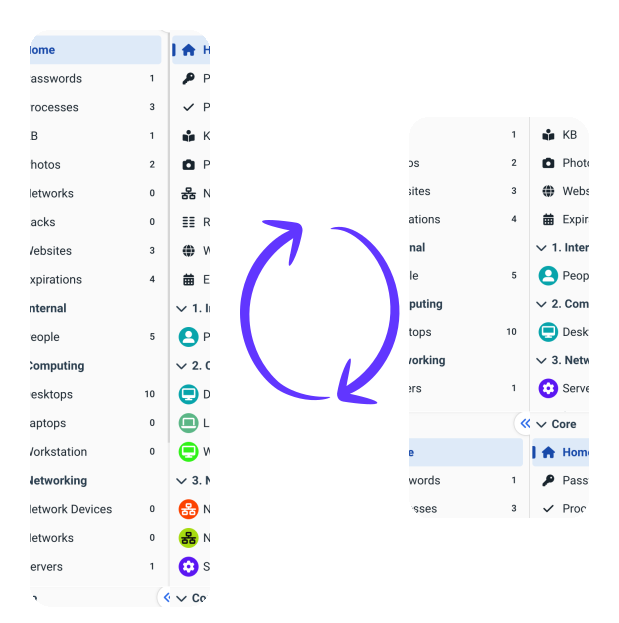
Did you know you can also hide empty asset layouts? If you select this option, only populated core and customized asset layouts will be shown for each company, as shown in the images below. Additionally, whichever method you prefer, hidden or all shown, your selection will be saved for the next time you come back into this company.
See what calm feels like
Give your team a documentation system they can rely on — during onboarding, incidents, and everything in between